Round 2 Open: Opt-in Summer 2026 Moodle Courses for Migration by Sept. 4
The final opportunity to migrate Moodle courses to Canvas is open as of 7/20/2026. Unlike spring where the most recent version of a course was included by default, Summer 2026 instructors must manually opt in any course they want migrated by Friday, September 4. Courses not selected will not be migrated. Opting in a summer or previously-missed development ("dev") course means those materials will land in Canvas after Fall term begins. If a course you expect to teach is in our offline archives, contact ATC immediately.
Note: Courses already in "migration queue" status are locked.
Canvas Transition Milestones
Last updated: 08/31/26
Check back to this page often to see where we are in the process of reaching each milestone that impacts the college, faculty and students.
Training Opportunities
Jump Links:
Spring Conference 2026
Date: May 1, 2026 | Location(s): Details on the Spring Conference 2026 Website
Modality: In-Person
Sessions will be open to all faculty and staff. They are designed to introduce Canvas and help participants build comfort with the college’s new LMS, whether they are new to Canvas or already have some experience with it. Topics may include basic navigation, editing content, adding course elements, and understanding how Canvas will be used and deployed at Lane.
Faculty One-Pager: Getting Started in Canvas
Recordings
Logging Into Canvas
Online, Self-Paced Resources (Asynchronous)
Available after the spring conference, instructors will have access to substantial online training resources through Canvas’s Training Services Portal — including self-paced learning pathways, written guides, videos, and live webinars. The same portal will be available to students once they gain access to Canvas. More information about additional virtual training opportunities will be shared as details are confirmed.
Growing With Canvas | Beginners
Estimated Time to Complete: 5 modules at 1.5-2 hr/module
Intended for:
- who have only used Moodle
- those with little - no experience with Canvas
Learn to navigate Canvas, build content, and organize modules.
Canvas Training Portal | Intermediate to Advanced
Estimated Time to Complete: (15-70 min/course)
Intended for:
- who have seen and interacted with Canvas as a Teacher
Comprehensive Canvas training from basic setup to advanced course methods.
Personalized One-to-one Support: Available 24/7
Available beginning: July 1, 2026
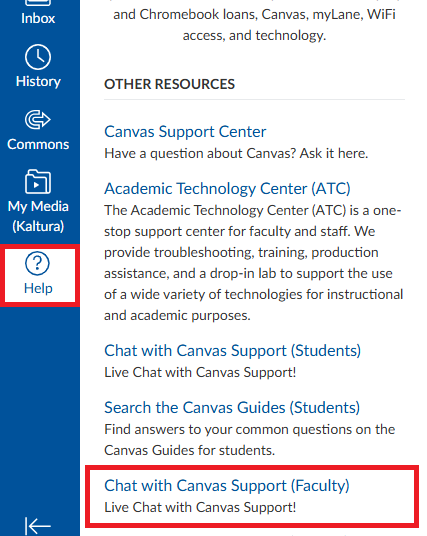
Users will have access to Tier 1 Canvas support for one-to-one help with common Canvas questions and basic troubleshooting. Support will be available 24/7 through chat and phone options in the Canvas Help menu. These support links and phone access will appear once the full Canvas subscription begins.
Optional: Sept 15th Canvas Training
To support instructors who work over the summer and those who want to begin working on courses immediately after migration the ATC is hosting 2 completely optional, online only, Canvas training sessions on Sept 15th. These sessions are repeats to those that occur on the Sept 17th and 22nd In-service sessions.
- Session One 12pm-1pm: Introduction to Canvas Essentials — Learn basic Canvas Navigation and how to jump in and start editing content that has been transitioned.
- Session Two 1:15pm-2:45pm: The Comprehensive Canvas Course Checklist — Learn how to review your course and Migration Exception Logs to ensure your course is prepped for students.
Register for Sept 15th Sessions
You will receive a Zoom link via email after completing registration. Complete the registration once for each session to receive both Zoom links.
Faculty Fall In-Service Week
Date: Sept 17th & Sept 22nd
Modality: Online and In-Person Synchronous options, limited in-person capacity.
This training carries over from spring training during Spring Conference 2026.
Additional Resources
- Instructor Getting Started Guide – A practical starting point for instructors who are new to Canvas. It brings together introductory guidance and links to additional support resources.
- Canvas Overview Video for Instructors – A short overview video that may be useful if you want a quick visual introduction before formal training begins.
- Canvas Basics Guides: Canvas Features – A good reference if you want to understand what a specific Canvas feature does. Many of these guides also include videos.
- Instructor Pre-Term Checklist and Migration Logs – Checklist to follow to prepare courses for launch with students including checking Migration Logs and reviewing course items.
Canvas Transition FAQ
Canvas will become Lane’s official LMS for classes beginning in Fall 2026.
Summer 2026 courses and student enrollments will remain in Moodle. Instructors are expected to receive limited access to Canvas by May 1, 2026 for training, review, and preparation.
Yes. Instructors are expected to have access to both systems during the Summer 2026 transition period.
Instructors can expect to have access to their completed migrated courses on Tuesday, Sept 1 to review migrated content and preparing for Fall term. Instructors will continue to have access to Canvas prior to the 1st to continue training and planning for migration.
While we cannot stop you, the intent behind the contracting of K16 was to avoid the immense amount of work that may be required in a manual migration process.
Unfortunately, directly importing content from Moodle into Canvas has an inconsistent success rate at best. Several activity types and question types do not cleanly transfer over to Canvas. Large swaths of more basic content may be carried over without issue, but the amount of work proofreading an import to ensure complete accuracy may end up doubling or tripling your workload for Fall term. Most critically, embedded content (links, files, media) is likely to have issues with an import, and Canvas's built-in reporting tools will not catch every last detail.
Any work that is done manually transferring your course materials is ultimately done at your own risk. The ATC heavily recommends waiting for K16 to transfer your content over. If you have a version of a course that is different than the ones you have set for migration, and want to ensure K16 uses the right version, contact the ATC.
In Moodle, Banner was connected, but instructors could still manually override enrollments inside the course. In Canvas, that override layer is intentionally removed for credit courses—enrollments come only from Banner, so manual student enrollments and self-enrollment are only available for development courses. Teachers can enroll colleagues into all courses as teacher and/or non-editing teachers.
Canvas treats Banner as the single source of truth to keep grading, reporting, and financial aid clean. If a student isn’t showing yet, it’s usually a sync delay; most resolve quickly (thanks to reduced lag between SIS->LMS), but ATC can verify and add a temporary enrollment if required.
Credit-based course names in Canvas come from Banner and follow a strict standardized naming convention.The name in Canvas needs to match what’s in Banner so students see consistent information across registration, transcripts, and course access.
Additionally, Canvas manages course naming at a system level, which means this isn’t a setting that can be turned on for some courses and off for others.
If you’re working in a development course:
- Any user (including faculty) can click the three-dot menu that appears on a course card within their Dashboard and choose “Nickname” to set a custom name. This only changes how the course displays on their Dashboard and does not alter the actual course name in Canvas. Similar to course card colors, it’s a personal display preference and only affects that individual user.
- Contact the ATC and request the course name be changed
Fall 2026 sections will be built and available in Canvas by September 1st.
Lane is migrating course content from Moodle to Canvas using K16 Solutions to help reduce the amount of manual rebuilding instructors need to do after the transition.
Not necessarily. Some content types, tools, and course elements may require review or adjustment after migration. More information will be shared as testing and quality review continue.
The college has contracted with K16 Solutions to migrate course content from Moodle into Canvas. K16 utilizes a “Scaffold Migration” approach along with an extensive team-based iterative review process to ensure that all course materials are imported correctly. The process includes test migrations, faculty review, technical adjustments, and final validation before broader sitewide migration moves forward.
At the beginning of the review process, prior to the migration of content, 12 instructors were jointly appointed by the LCCEA (Union) and the College. Instructors were involved in the quality review process were selected from courses that reflect a range of course types and complexity. The quality review was completed and migration will take place and be completed on September 1st.
What if the migrated course has missing or broken items?
All instructors should review the Migration Exception Log of each of their courses. Inside every migrated course is a page (Course > Pages) called “Migration Exception Log” that lists any error or warning that occurred during the transfer process. Examples: identify any unsupported question types, restricted access settings, books moved into pages, lessons deconstructed into multiple pages, etc.
ATC is offering two online-only training sessions on Tuesday, September 15th, before in-service, to help get instructors immediately begin working on courses. Join us online by registering here. You will receive a Zoom link via email after completing registration. Complete the registration once for each session to receive both Zoom links.
- Session One 12pm-1pm: Introduction to Canvas Essentials — Learn basic Canvas Navigation and how to jump in and start editing content that has been transitioned.
- Session Two 1:15pm-2:45pm: The Comprehensive Canvas Course Checklist — Learn how to review your course and Migration Exception Logs to ensure your course is prepped for students.
Additional information and Registration for Fall In-Service will be sent out soon for Canvas Training on Sept 17th and Sept 22nd with in-person and online options.
Previous and other active training opportunities:
- Asynchronous online training options: Growing with Canvas & Canvas Training Portal (view the details above).
- Canvas Guides (general how-tos)
- Spring Conference sessions on May 1, 2026 (view the recordings on this page above).
Yes. Instructors can now access and explore Canvas on our Canvas site. Instructors may use their own sandbox Dev Shells to become familiar with Canvas. We strongly recommend waiting for the official migration of content rather than importing content yourself, as this automated process will save you significant time and effort.
Most of the top-used LTI / external tools are already enabled in Canvas, and we are continuing to work through the remaining list. If you rely on a tool for Fall term and you cannot find it in Canvas, contact the ATC (atc@lanecc.edu) so we can make it a priority.
Canvas does not integrate with H5P the way Moodle did. Activities initially come across as placeholders and have to be reconnected after migration. Beginning September 1, the ATC will identify which courses use H5P and contact those instructors to build a plan for reconnecting the broken activity links. We will reach out to you, and courses running fall term are prioritized first.
Canvas (canvas.lanecc.edu) is Lane’s official LMS for student enrollments and class materials beginning Fall 2026. General access to Moodle will cease on September 14, 2026 and all user access will be suspended by default. Individual instructor access will be granted through December 31, 2026 if an instructor submits a Moodle extended access request. Student access to Moodle will be restricted to grade appeal review.
If there is something in Moodle you know you need, and it has not been queued for migration, we recommend downloading it now rather than waiting on a request later.
Official Transition: Lane courses will officially be on Canvas in Fall 2026.
All Moodle Access Concludes:
Monday, September 14, 2026
* Individual instructor access will be granted through December 31, 2026 if an instructor submits a Moodle extended access request.
Request Canvas Meta/Development Shells
Reminder: To retain the highest fidelity and reduce cleanup, please rely on our migration of Moodle content through K16. Dev shells are best used for completely new content and courses and to learn how to use Canvas as an instructor.
What Can I Do Now?
- Instructors: Starting Sept 1st, access Canvas and begin reviewing migrated course content. Go through and complete the pre-term checklist, including reviewing each course's Migration Logs and making any necessary edits and updates. Finally, attend ATC training or complete online training and review online resources. Instructors should prioritize course revisions for Fall CRNs. Once courses are reviewed and ready, import your courses into Fall CRNs.
- Students: No action is needed right now. Courses and student enrollments will remain in Moodle through Summer 2026 (September 13th), and Canvas will become the official LMS beginning in Fall 2026.
- Staff: Reminder that Moodle access will conclude for all students and staff starting Sept. 14th. If you have a course that students or other staff interact with, contact the Academic Technology Center (atc@lanecc.edu) to ensure your courses are set to transition and that loss of access between Moodle and Canvas is as minimal as possible.
- Deans and Directors: Encourage instructors to review their migrated course content, begin editing and any cleanup, attend Canvas training hosted by ATC (Sept 15th-optional, Sept 17th, and Sept 22nd) or Canvas, and prioritize preparing courses for students in Fall courses.