Canvas Course Template + WYSIWYG Accessibility Checker
Building a Firm Foundation
The LCC Canvas Course Template was originally derived from Quality Matters™ and then later adapted to integrate OSCQR best practices. The template includes a general backbone for an online course. Each component can be edited and made to fit the instructor's own style. The template could be very beneficial for anyone wanting to reorganize an existing course or for the development of new courses. Some departments work with ID Services to develop a template for a group of courses.
Canvas is designed to give an equitable experience to all users. That changes when we start uploading and creating our course materials. There is a feature within Canvas that can be very helpful in checking your Canvas content. Canvas' WYSIWYG text editor, contains a built-in accessibility checker. This helps to ensure that any text you add to a description or Canvas page will be accessible. It's quite easy to use. This tool, along with Yuja, can help you provide high-quality, accessible materials for your students.
Related tutorials and resources: How to Add the LCC Course Template [OSCQR]
Any Lane course can use the LCC Canvas Course Template. You can preview its content within the Canvas Commons before deciding if you want to import and use it in your own course. This template was designed by our ID team to incorporate consistent navigation and useful Lane-specific resources in order to reduce faculty stress when designing and student stress when enrolling in a new class. Here are a few advantages:
Consistent Navigation
Using the IDS course template provides users–whether faculty or students–with consistent weekly or module navigation. Students start the week with an overview that ties what they’ll learn to the course’s major outcomes, making plain how their progress supports the class’s overall goals. From this to-do list, they work through resources like readings, videos, and other multimedia presentations that help them understand the week’s topic. The Activities section provides a way for students to apply what they’ve learned. Finally, each module provides space for formative or summative assessment, where students can track their progress and receive feedback.
Updated Policies and Resources
The IDS template comes with Course Orientation and Syllabus resources that have standard Lane policies already plugged in. Instructors can start the course – and the term – off right by quickly filling in the blanks on these documents, which will provide students with an easy-to-use and well-designed path through the most critical first-week information. This information is updated as campus information changes, and our team can assist with quick updates each term as needed.
Interested? Keep going!
Follow steps 1-3 to access Canvas Commons and preview the course content (You will need to log in to Canvas to access the Canvas Commons)
Ready to use the course template in one of your courses? The ATC (Academic Technology Center) can help import the template into your course. Include the course CRN# and the course name in your request. Contact ATC@lanecc.edu.
Are you thinking about redesigning your course? Contact idservices@lanecc.edu for more information or go to the ID Services website for an overview of the course development process.
Not any one tool can identify or solve all accessibility issues. There is a feature within Canvas that can be helpful in checking your content. Canvas' WYSIWYG text editor contains a built-in accessibility tool. This helps to ensure that any text you add to a description or Canvas page will be accessible. It's quite easy to use, but similar to all automatic accessibility checkers, it’s not 100% effective.
Use the accessibility icon at the bottom right of any text editor within Canvas to start checking your content.
Tip: Scrolling over an icon in the editor will give you a tooltip that tells you the name of the function.
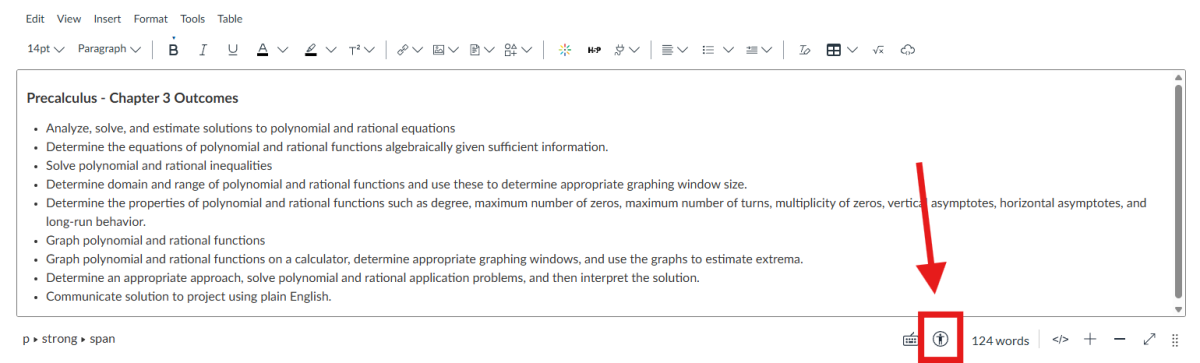
The Accessibility Checker
The Accessibility Checker button (marked with a circular accessibility symbol) brings up an automated accessibility checker that checks for common errors in the text, such as:
- Images with missing or empty alt text
- The contrast of font color and background color meets WCAG AA guidelines
- Long blocks of text are not sufficiently broken up with headings
- Tables missing captions and header rows
- Ordered/unordered lists are styled (rather than typing numbers or bullets)
To use the checker:
- Turn editing on in your course
- Go to and click into the Canvas page, activity, etc., you want to check and choose Edit at the top right of the page to begin editing its content.
- In the text editing area choose the Canvas Accessibility Checker (marked with a circular accessibility symbol/icon). The results will identify if you have any of the errors listed above.
- Fix the items in question and save your page.